Technical diagram showing how to set up ai voice agent for customer support calls
A technical guide on building, connecting, and deploying real-time AI voice agents for customer support calls with sub-second latency.
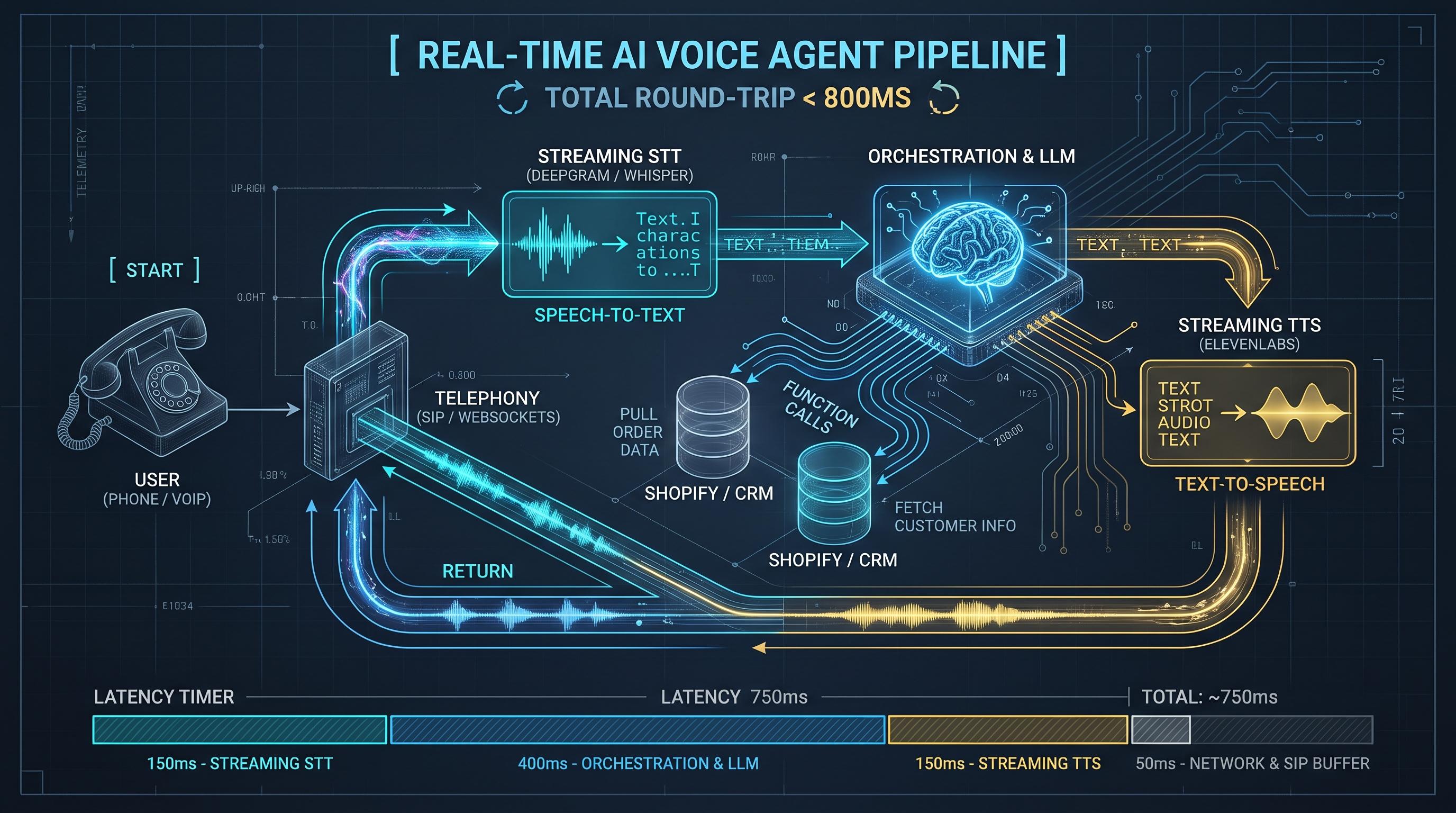
To understand how to set up ai voice agent for customer support calls, you must look beyond basic chatbots. A voice agent does not simply read text from a prompt. It operates an event-driven, bidirectional audio pipeline capable of transcribing human speech, reasoning through user intent, fetching external customer data, and streaming synthetic voice back over a telephone network in under 800 milliseconds.
For high-growth ecommerce brands and technical operations, modern voice agents automate repetitive inbound queries like order lookups, returns, and Tier-1 diagnostics without forcing callers through frustrating numeric touch-tone menus. Here is how the complete architecture works, how the components connect, and how to deploy a reliable system.
The Core Architecture of a Real-Time Voice Agent
A production voice system runs four distinct operational layers in a tight loop:
- Telephony Layer: Connects to the public switched telephone network (PSTN) using protocols like SIP (Session Initiation Protocol) or WebRTC, routing live audio over WebSockets.
- Speech-to-Text (STT): Ingests incoming 8kHz or 16kHz audio chunks and converts them into text in real time with continuous streaming transcription.
- Intelligence and Orchestration (LLM): Parses customer transcripts, maintains conversation state, calls tools (APIs, databases), and streams tokens.
- Text-to-Speech (TTS): Converts generated text tokens back into PCM audio frames and streams them back to the caller.
Each transition introduces latency. If your total round-trip time exceeds one second, callers notice the pause, assume the call dropped, and speak over the agent. Successful deployments optimize every step to keep round trips between 500ms and 800ms.
Step 1: Establish Your Telephony Connection
Your voice agent begins with a programmable telecommunications carrier such as Twilio, Telnyx, or SignalWire. These platforms allow you to purchase local or toll-free numbers and manage call sessions via webhooks.
When a customer dials your support line:
- The carrier receives the call and fires a webhook to your application server.
- Your server responds with instructions to open a bidirectional media stream over secure WebSockets (
wss://). - The carrier converts the telephone audio (usually G.711 mulaw or raw PCM) into binary chunks and sends them across the socket continuously.
Using bi-directional WebSockets rather than static HTTP polling is mandatory. Without a persistent socket connection, real-time interruptions and low-latency audio transmission are impossible.
Step 2: Configure Streaming Speech-to-Text and VAD
Once the audio stream enters your server, you must process it through Voice Activity Detection (VAD) and a low-latency speech recognition model. Services like Deepgram Nova-2, AssemblyAI Streaming, or self-hosted Whisper engines excel here.
Key considerations for this layer include:
- Voice Activity Detection: VAD detects the exact millisecond a caller begins and stops speaking. Silero VAD or WebRTC VAD running locally inside your server cuts network overhead by deciding instantly whether incoming audio contains speech or silence.
- Endpointing: This is the pause duration that signifies a caller has finished their sentence. Setting endpointing too low (e.g., 200ms) causes the agent to cut callers off while they think. Setting it too high (e.g., 800ms) creates sluggish conversations. A threshold of 400ms to 500ms is standard for customer support.
- Interruption (Barge-In): If the customer speaks while the AI is responding, your system must immediately cancel current LLM generation, clear the TTS audio playback buffer, and start transcribing the caller's new query.
## How to Set Up AI Voice Agent for Customer Support Calls: The LLM Engine
The LLM handles dialog management, tool calling, and business logic. Setting up this layer requires balance between model intelligence, inference speed, and operating overhead.
Prompt Design for Spoken Interfaces
Prompt engineering for voice is fundamentally different from chat. Spoken responses must be concise, conversational, and direct:
- Instruct the model never to use markdown tables, bullet points, asterisks, or complex URLs.
- Direct the agent to speak one or two sentences at a time, followed by a clarifying question.
- Keep numbers natural. Train the agent to say "five four zero zero" or "fifty-four dollars" instead of outputting unformatted raw symbols.
Function Calling and Tool Integration
A support agent that cannot check an order status or update a shipping address is merely an interactive FAQ. Connect your LLM orchestration layer to your store platform (Shopify, ERP, custom database) using structured function calling.
When an agent needs to retrieve information:
- The model emits a function payload (e.g.,
getOrderStatus(order_id="1042")). - Your backend executes the API call against your CRM or database.
- The backend returns a concise JSON response to the model context.
- The model converts that data into conversational speech.
Voice agents consume thousands of tokens per minute during long calls because conversation history accumulates rapidly. If you are scaling production traffic, read our guide on How to Reduce LLM API Costs in Production to optimize context windows, prompt caching, and model routing without introducing lag.
Step 3: Implement Low-Latency Text-to-Speech
Traditional TTS generates an entire audio file before playing it. Real-time voice agents cannot afford this delay; they require streaming chunked TTS. Providers like ElevenLabs (via their WebSocket API), Cartesia Sonic, and Deepgram Aura allow you to send partial text tokens as the LLM generates them, returning playback audio in 100ms to 200ms.
To make the voice feel natural:
- Pre-buffer the first 3 to 5 words generated by the LLM before sending them to the voice synthesizer. This gives the model time to establish context for proper vocal inflection.
- Cache static audio files for universal phrases, such as the initial greeting ("Thank you for calling. How can I help you today?") or standard call-transfer notices. Playing a local pre-rendered audio file drops initial response time to zero.
Step 4: Handle Human Handoffs and Escalation
No AI agent handles every edge case. A production architecture must include graceful human escalation via SIP referral (REFER) or live call transfer:
- Define clear triggers for transfers: explicit customer requests, high frustration sentiment scores, or repeated API failures.
- Maintain context during the transfer. When the agent initiates a transfer to a human representative, push the call summary, customer verified identity, and transcript to the agent's CRM screen via webhooks before the call bridges.
What to Monitor in Production
Deploying a voice agent is an ongoing optimization effort. Track these four core metrics:
- Time to First Byte (TTFB): The elapsed time between the caller finishing their sentence and the first audio frame returning to their ear.
- Interruption Accuracy: How reliably the system detects true caller barge-in versus ambient background noise or caller breathing.
- Resolution Rate: The percentage of inbound calls resolved without escalating to a human team member.
- Telephony Packet Loss: Jitter and packet drop rates across your carrier WebSockets, which cause audio to sound robotic or clipped.
If your team is evaluating automated workflows, enterprise voice infrastructure, or digital automation, XEONTRIX provides custom AI voice agent engineering and workflow integration designed for high-volume operational environments.
Questions people ask
What is the acceptable latency for an AI voice agent on support calls?
Total round-trip latency should remain under 800 milliseconds. Pauses exceeding one second interrupt conversational flow and lead callers to speak over the system.
Can an AI voice agent look up customer data in real time?
Yes. By using LLM function calling linked to backend APIs or workflow automation platforms, the agent can verify callers, pull order details, and issue tracking links during the call.
What happens when a caller interrupts the AI while it is speaking?
A proper voice pipeline uses Voice Activity Detection (VAD) to immediately identify barge-in, abort pending text generation, clear the audio output buffer, and listen to the new input.
How does the AI transfer a call to a live human representative?
The system issues a SIP transfer command to the telephony provider while simultaneously firing a webhook to the CRM dashboard to deliver the call transcript and customer profile to the human agent.